HYDRA-TECH is Luminous’ most advanced digital rain system, capable of creating images, text, logos, and patterns entirely from falling water. From concerts and live events to brand activations and themed attractions, HYDRA-TECH has captivated audiences around the world with its unique ability to transform rain into a dynamic visual display.
But how does it actually work?
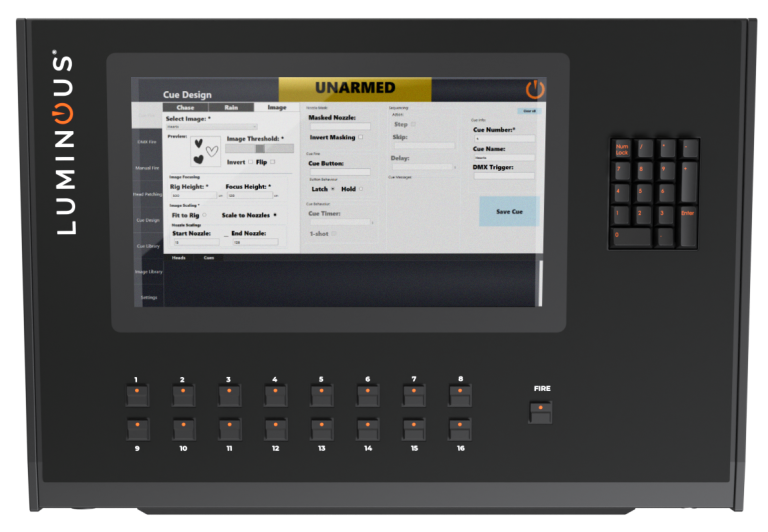
How HYDRA-TECH Creates Images
When an image is uploaded to the HYDRA-TECH Control Desk, the system converts it into a black and white format. The operator can then adjust the image threshold, contrast, positioning, and other settings to optimise it for display in the water.
The software interprets the image by assigning each section as either “water” or “no water”. Areas represented by black pixels are typically displayed as falling droplets, while white areas remain blank, although this can be inverted if required.
At the heart of HYDRA-TECH is a series of electronically controlled valves. Each valve produces a single stream of droplets, and there are 48 individual valves in every metre of rain head.
As the valves rapidly open and close in sequence, they create a curtain of falling water that forms the image as it passes through the air. When viewed, the individual droplet streams combine to reveal the complete design.
What Images Work Best?
HYDRA-TECH can display almost any image, but high-contrast designs typically produce the most effective results.
Since images are converted into black and white, artwork with clear separation between dark and light areas tends to be more recognisable. Logos, text, symbols, and bold graphic elements generally work exceptionally well.
The level of detail that can be achieved also depends on the size of the HYDRA-TECH installation. A 3-metre system containing 144 valves, allows for impressive imagery and text. However, a larger installation, such as a 12-metre system, containing significantly more valves, enables finer detail, precision, and greater image resolution.
Simply put, more valves mean more pixels in the water display!
Uploading Images
Images are uploaded using the HYDRA-TECH Control Desk.
Operators can import image files directly from a USB drive and use the Control Desk to prepare them for display and show sequences. Once uploaded, images can be positioned, adjusted, and programmed into cues alongside other effects within the show sequence.
The Control Desk provides complete control over how the image appears in the rain, allowing operators to fine-tune the display for the best possible result.
Top Tips for Creating Great Water Images
- Use bold, high-contrast artwork wherever possible.
- Create your own custom designs using software such as Adobe Illustrator, Adobe Photoshop, Canva, or even Microsoft Paint.
- Consider the size of your HYDRA-TECH system when designing imagery, as larger systems can display more detail.
- Ensure the Control Desk is configured with the correct installation height and system dimensions, as these settings directly affect how the image appears. (Our team are on hand to help!)
- Longer image canvases can be used to display multiple images, messages, or patterns within a single cue, creating engaging and dynamic water displays

Endless Creative Possibilities
One of the most exciting aspects of HYDRA-TECH is its flexibility. Whether you’re displaying a corporate logo at a product launch, an artist’s name at a concert, or a bespoke pattern for a themed attraction, the possibilities are almost limitless.
Sometimes the simplest designs can create the most striking effect. Even a few carefully placed lines or shapes can produce beautiful visuals in falling water.
Want To Create Images With A Rain Machine?
HYDRA-TECH combines intelligent software and innovative design to transform ordinary water into an extraordinary visual experience. If you’d like to learn more about HYDRA-TECH or discuss how digital rain could enhance your next project, get in touch with the our friendly team today.